Written
Prompt to Product
Interactive courses on LLM and agent engineering that explain how and why LLM-based technologies drive productivity in practice.
Languages:中文
Giving a model a prompt and receiving a paragraph back is still a long way from getting work done.
When a system needs to look up a route, read files, run commands, or connect to a team service, productivity does not come from one model response in isolation. It comes from an observable, constrained, and feedback-driven runtime: the model interprets a goal and expresses intent; a client prepares context, performs controlled actions, and returns results; tools connect the system to the real world; and a loop moves the task forward.
I turned concepts I often explain to colleagues, friends, and family into Prompt to Product, an interactive course site. Rather than presenting LLMs or agents as all-purpose, magical capabilities, it uses dynamic architecture diagrams, execution examples, and short quizzes to show how and why they can become productive systems.
Terminology: An LLM (large language model) interprets context and produces intent. A client is the runtime that connects users, models, and tools. An agent defines a role and way of working. A skill captures domain knowledge, tool constraints, and execution rules. An agentic loop repeatedly moves a task forward through model decisions, client execution, and returned results.
When Models Start Doing Things
Why can an LLM that only outputs text still use tools and complete tasks?
Important questions are hard to explain through definitions alone. How does a model “use” a map, a file, or a command line? How does it call a tool? What are the distinct responsibilities of a client, an agent, and a skill? How does an agentic loop turn a request into a deliverable?
The outcome often hides the process. The courses return to engineering facts: the environment in which a model runs, the context it receives, the permissions on its tools, and the feedback it gets from the system. Separating these parts makes both capability and limitation easier to understand.
Course One: The Evolution of LLM Application Architecture
The first course uses switchable, animated topologies to show four stages of LLM applications, from a single-turn interaction to multi-agent collaboration. Each stage identifies its actors, information flow, and system boundaries.
1. A Standalone LLM Chat
A user sends a prompt to the model through a client, which returns the text response to the user. The model mostly relies on knowledge internalized during training. The interaction is usually single-turn and stateless, with no access to external tools.
2. Tool Calling
The system adds a tool orchestrator and external APIs. The model expresses an intention to call a tool; the client or application validates and executes that call, then returns the result to the model for its final response.
The crucial distinction is that the model produces intent, not system actions. Actual file, network, and command-line operations still happen inside a controlled runtime.
3. An Autonomous Agent
The task becomes a loop instead of a linear question and answer. The model selects an appropriate skill; the client reads its instructions, injects context, performs an action, persists state, and returns the result. The model then makes another decision based on that new information until the objective is complete.
Even when a system is called an agent, execution authority, memory management, and security boundaries remain with the client.
4. A Multi-Agent System
More complex work can be divided by role: a router assigns tasks, a research agent gathers information, an execution agent performs the work, a review agent tests and provides feedback, and the system compiles the final deliverable.
Multiple agents do not necessarily mean multiple models. They may be repeated runs of the same model with different role prompts, context, and tool permissions. The important parts are coordination and accountability, not the number of labels.
Course Two: Giving LLMs Senses and Hands
The second course focuses on how an LLM connects to real tools. It traces the complete path of an executable task across the collaboration boundaries among the client, agent, skill, and tool calls.
The LLM Is the Brain; the LLM Client Is the Runtime
An LLM is good at interpreting context, generating text, and identifying a next step. It cannot directly operate a file system or command line, or access network resources. The client handles user I/O, context assembly, history, permission control, and controlled tool execution.
An executable agent product comes from their collaboration, not from attributing the ability to act to the model alone.
How the Agentic Loop Advances a Task
A standard loop can be summarized as follows:
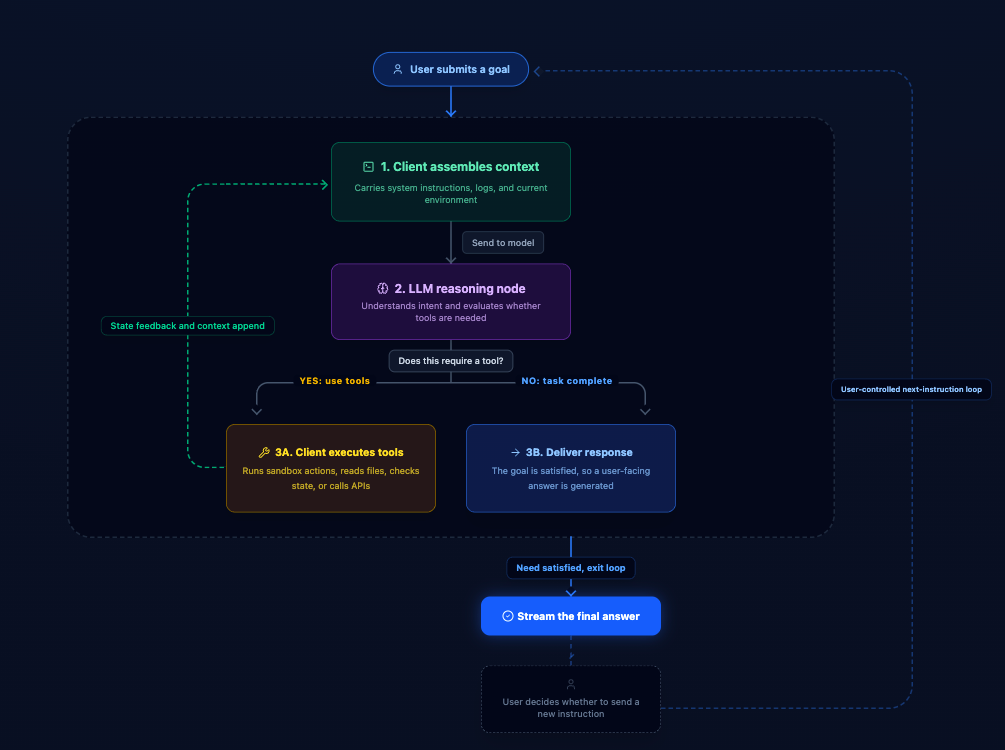
- A user states an objective.
- The client assembles context and sends it to the LLM.
- The model decides whether a tool is needed and expresses a call intent.
- The client executes the operation in a controlled environment and returns results, logs, and state.
- The model evaluates the feedback and continues until it can deliver an outcome.
The user can also issue a new instruction at any time, creating a larger interaction loop around the execution loop. This makes the process visible, auditable, and interruptible rather than an invisible black box.
Why Agents and Skills Should Be Decoupled
The course separates three kinds of assets:
- Agents define a role, persona, and way of working. They answer, “Who does this?”
- Skills capture domain knowledge, tool constraints, and execution rules. They answer, “How should this be done correctly?”
- Clients assemble both into an executable request.
In practice, a client can inject an agent persona and a lightweight skill index first. Once the model identifies a required capability, it expresses an intent to retrieve the relevant skill document through a tool call, which the client then executes. This supplies specialized rules without filling the initial context with every detail.
Three Common Forms of Tool Call
- Built-in tools: capabilities such as reading a workspace, searching code, or asking for clarification.
- Shell / runtime tools: operations close to engineering work, including commands, builds, and tests.
- MCP / remote APIs: connections to external platforms and services that extend the system’s capabilities into team systems.
The LLM produces call intent; it does not acquire control over the tools themselves. Sandboxing, least privilege, audit records, and confirmation before irreversible actions should be enforced by the client or the underlying system.
Productivity Comes From Orchestrated Attention
Inside the model, the attention mechanism helps the LLM relate information across its context. At the engineering-system level, productivity comes from orchestrating attention one step further: bringing the right goals, context, skills, and tools into a task at the right time. The LLM’s value is not only that it can write fluent prose. Under those conditions, it can identify a useful next step and participate in real work through controlled tools. Reliability, however, comes not from expecting the model to be all-powerful, but from clear responsibilities, appropriate permissions, feedback that returns to the system, and human confirmation for high-risk actions.
The site currently includes these two foundational courses. The next course will explore model capabilities and boundaries:
- What is a model?
- Why can a model generate text?
- How should we understand model capabilities?
- If a model outputs text, why can it call tools?
- Which problems can a model handle directly, and which require tools, retrieval, rules, human confirmation, or system constraints?
Understanding what a model can do and what it cannot do is how we apply LLMs and agents safely where they are genuinely useful.
Visit the course site: https://llm.hclife.edu.pl/
Discussion